 50.005 CSE
- The Authentication Handshake Protocol
- Certificate Authority
- Proposed AP
- Starter Non-secure FTP
- Grading
50.005 Computer System Engineering Information Systems Technology and Design Singapore University of Technology and Design Natalie Agus (Summer 2026)
The Authentication Handshake Protocol
Imagine there exist a secure server called SecureStore (the server’s name) at some advertised IP address. As clients, we want to upload our files securely to these file servers. In the real world, this secure server might be Dropbox, Google Drive, etc. We can’t simply trust the IP address because it’s easy to spoof IP addresses.
Hence, before the file upload, your client should authenticate SecureStore’s identity. To do that, you’ll implement an authentication protocol (AP) which bootstraps trust by a certificate authority (CA).
Authentication Protocol (AP) Design
The purpose of this protocol is for a client to authenticate that a message sent by SecureStore is indeed created by SecureStore and not some malicious party.
We can design a simple AP using public key (i.e., asymmetric) cryptography.
What you can do is:
- Ask SecureStore to sign a message using its private key and send that message to you.
- You can then use SecureStore’s public key to verify the signed message.
- If the check goes through, then since only SecureStore knows its private key but no one else, you know that the message must have been created by SecureStore.
Reliably Obtain Public Key
There’s one catch, however. How can you obtain SecureStore’s public key reliably?
If you simply ask SecureStore to send you the key, you’ll have to ensure that you’re indeed receiving a reply from SecureStore, otherwise you are susceptible to the a man in the middle attack.
There’s circular dependency here: you’re replacing an authentication problem by another authentication problem!
Certificate Authority
In the Internet, trust for public keys is bootstrapped by users going to well known providers (e.g., a reputable company like Verisign or a government authority like IDA) and registering their public keys.
The registration process is supposed to be carefully scrutinized to ensure its credibility (although in practice it might vary), e.g:
- You may have to provide elaborate documents of your identity or
- Visit the registration office personally so that they can interview you,
- Verify your signature, etc (analogous to the process of opening an account with a local bank).
That way, Verisign or IDA can sign an entity’s (in our case, SecureStore’s) public key before giving it to you (client) and vouch for its truthfulness.
Bootstrapped trust
We’re bootstrapping trust because we’re replacing trust for SecureStore by trust for VeriSign or IDA. This works because it’s supposedly much easier for you to keep track of information belonging to IDA (i.e., their public keys could be considered “common knowledge” that your browser can obtain) than information about a myriad of companies that you do business with.
Getting CA’s Root Certificate
Recap
A certificate contains a public key. If we have the CA’s certificate, we have its public key too.
Either your browser or your OS ships with a set of trusted CA certificates. If a new CA comes into the market, then the browser or the OS will need to ship a software update containing the new CA’s information.
csertificate
In this assignment, you won’t use VeriSign or IDA. Instead, the CSE teaching staff has volunteered to be your trusted CA. We call our service csertificate, and we’ll tell you (i.e., your SecureStore and any client programs) our public key in advance as “common knowledge”.
We have given our CA certificate in your starter project: auth/cacsertificate.crt. This is analogous to how your browser or OS ships with a set of trusted CA certificates.
Proposed AP
Please read this whole section from start to end carefully before you begin your implementation. You need to stick to the suggested protocol carefully to obtain the highest tier of marks for this assignment.
Task 1 (2%)
TASK 1: Implement an Authentication Protocol. You are expected to make a copy of the starter non-secure FTP and modify it. Read along first to get the general idea.
To get you started, we suggest a few things that you can do to authenticate the identity of SecureStore. You are the administrator of SecureStore in this context.
SecureStore Public Key Generation
SecureStore generates RSA private and public key pair (use 1024 bit keys). It also creates a certificate signing request (.csr), where it submits the public key and other credentials (e.g., its legal name).
- You can do this by running the
generate_keys.shscript provided inauth - This uses the
opensslcommand-line tool to generateserver_private_key.pemandserver_certificate_request.csr. Study whatgenerate_keys.shdoes carefully.
csr Creation and Upload
SecureStore server uploads the certificate signing request (.csr file) for approval to csertificate, our CA. Our Certification Authority is integrated with our CS Telegram bot (@cssubmitbot).
Simply type /start to our bot and follow the instructions. Our bot CA will:
- Verify the request, and
- Sign it to create a certificate containing SecureStore’s public key (
server_signed.crt), and - Note that the bot signs the
cacsertificate.crtusingPKCS1v15padding. - Pass the signed certificate back to SecureStore.
- This certificate is now bound to SecureStore and contains its public key.

Obtaining signed certificate
SecureStore retrieves the signed certificate by our CA by downloading it from the bot. Now, save the file server_signed.crt under auth/ directory.
When clients later ask the SecureStore server for its public key, the server provides this signed certificate.
- The client can verify that this certificate is indeed signed (authorised) by our trusted CA csertificate using csertificate’s Public Key, embedded within
cacsertificate.crt. - Use the provided method
verify_server_cert(server_cert, "auth/cacsertificate.crt"). This function handles thePKCS1v15verification and validity period check internally.
Recall that csertificate’s public key is embedded within cacsertificate.crt given to you in the starter code. In real life, this should be a well known certificate shipped by the Browser/OS.
Self-signed certificate
SecureStore should not sign its own certificate and pass it to the client. There is no chain of trust this way. The entity that signs SecureStore’s certificate has to be our CA, so please contact the Telegram bot (@cssubmitbot).
Authentication Protocol Basis
The diagram below gives the basis of a possible authentication protocol. Take note of the MODE. The MODE preceeding the streams of messages (M1, M2) sent by the Client tells the server what kind of message it is. Then, M1 tells the server the size of M2 so that the Server can read that appropriate number of bytes from the socket.
Socket read is a blocking operation, thus it is important to design a protocol between client and server properly to know who is supposed to read/send at any given time.
The size of M1 is designed to be not more than 8 bytes. The next section will explain this in more detail.
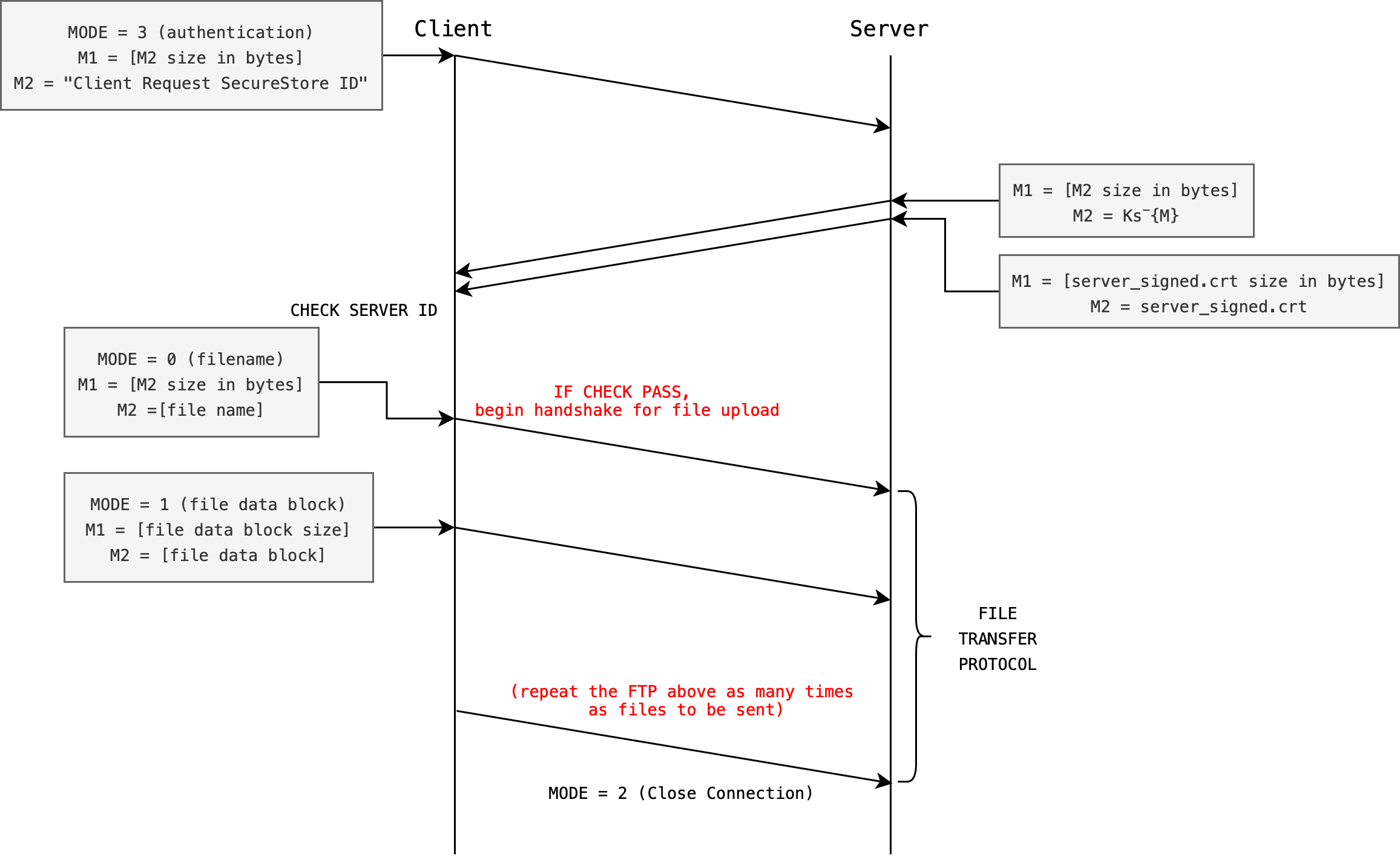
The server (SecureStore) has the following items to encrypt/decrypt messages from the client when necessary:
- Signed certificate
server_signed.crt, containing server public key: \(Ks^+\) signed by our CA - Server private key: \(Ks^-\), can be extracted from
server_private_key.pem
Upon successful connection, the client shall send an arbitrary message to the server. The server respons by signing message using its private key and PSS padding, which is the modern padding standard for signatures.
Then, the server sends both the signed message and server_signed.crt certificate to the client.
PKCS1v15 Padding vs PSS Padding
Our CA bot signs the cacsertificate using PKCS1v15 padding (older standard) for demonstration purposes. For your assignment, you need to use the PSS padding.
Use the given functions sign_message_pss() given to sign and verify_message_pss() to verify. Both use RSA-PSS with SHA-256 and maximum salt length internally.
PSS padding is considered better than PKCS#1 v1.5 because it introduces randomness, making it more secure and resistant to certain cryptographic attacks.
Checking Server ID
During the step labeled CHECK SERVER ID, the client must do the following (functions to use are listed below):
- Verify the signed certificate sent by the Server using CA’s public key Kca+ obtained from
cacsertificate.crtfile:verify_server_cert(server_cert, "auth/cacsertificate.crt"), this returns 1 if valid, 0 if not
- Extract
server_public_keyKs+ from the verified cert:EVP_PKEY *server_pub_key = X509_get_pubkey(server_cert);
- Verify the signed message using
verify_message_pss()to confirm that M is the same message sent by the client in the first place - Check validity of server cert:
verify_server_cert()already checks the validity period internally
- If the
CHECKpasses, the client will proceed with file upload protocol (next task) - In the event that the
CHECKfails, the client must close the connection immediately (abort mission)
AP Flaw
There’s one problem with the proposed AP above (means it has a vulnerability). You need to identify and fix this problem in your submission.
A complete implementation of the AP including fixing this flaw will grant you 2% of your grades.
Starter Non-secure FTP
The starter code given to you has implemented a simple, non secure file transfer protocol (FTP). Here’s how it works.
Client data format and message MODE
Upon successful connect, the Client will send messages to the server in this general form:
- First to send a
MODE(auint64_tconverted to 8 big-endian bytes viasend_int()), - Then to send streams of
messages. There might be more than 1 message sent after eachMODEdepending on the purpose of theMODE.
There are 3 default MODEs provided. We define this inside common.h for you:
/* ======================================================================
 * Protocol message types
 * ====================================================================== */
#define MSG_FILENAME 0
#define MSG_FILE_DATA 1
#define MSG_CLOSE 2
#define MSG_AUTH 3 /* For AP and CP1 */
#define MSG_SYMKEY 4 /* For CP2 */
Client messages
After a MODE is sent, client may proceed to send streams of messages without waiting. We typically send two things in tandem: the size, and the content.
In the diagram above, two messages are sent.
- The first message is labeled as
M1: the size of the second message (this size alone not exceeding 8 bytes to represent by design). - The second message labeled as
M2: the actual content of the message. There are many different types of messages, indicated by theMODE.
Note that sockets always send and receive in bytes. In C, all data is already bytes as you work with unsigned char * buffers directly.
M1 (size) and M2 (content) are sent this way so that the server is able to read from the socket exactly those number of bytes dictated in M1.
Server Protocol
The Server will at first listen to MODE sent by client at all times, as it should be the first data sent by the client, and then attempt to read accordingly.
Open the server code and read under the while loop. It systematically inspects the content of client’s messages and categorise it as different cases:
 while (1) {
        /* Read 8-byte message type */
        unsigned char *type_buf = read_bytes(client_fd, INT_BYTES);
        if (!type_buf) break;
        uint64_t msg_type = bytes_to_int(type_buf);
        free(type_buf);

        switch (msg_type) {
        case MSG_FILENAME: {
            /* If the packet is for transferring the filename */
            break;
        }
        case MSG_FILE_DATA: {
            /* If the packet is for transferring a chunk of the file */
            /* Extract basename and prepend "recv_" */
            /* Write the file with 'recv_' prefix */

            break;
        }
        case MSG_CLOSE:
            /* Close the connection */
            printf("Closing connection...\n");
            goto done;

        default:
            fprintf(stderr, "Unknown message type: %lu\n", (unsigned long)msg_type);
            goto done;
        }
    }
Based on the MODE server will categorise the stream of following messages sent by client as the following:
- MODE
0(MSG_FILENAME): two messages will be sent by the clientM1: The filename length (this is no more than 8 bytes long by design)M2: The filename data itself with size dictated in the first message
- MODE
1(MSG_FILE_DATA): two messages will be sent by the clientM1: size of the data block in bytes (not more than 8 bytes long by design)M2: the data block itself with size dictated in the first message
- MODE
2(MSG_CLOSE): no message is expected. This is a connection close request.
It is not always necessary to send two messages after each MODE int data is sent, if the server knows EXACTLY the number of bytes that the client will send following a MODE. For this assignment however, follow the protocol stated in this handout closely.
Expanding the FTP to Implement Task 1
Make a copy of the original ClientWithoutSecurity.c and ServerWithoutSecurity.c each, and name them ClientWithSecurityAP.c and ServerWithSecurityAP.c in your current project directory. Leave the original files as is. You should have 4 .c files now under source/ (plus common.h and common.c which you do not modify).
All your new files must #include "common.h" at the top. This gives you access to all the crypto wrapper functions and socket helpers.
#include "common.h"

int main(int argc, char *argv[])
{
    if (argc < 3)
    {
        printf("Usage: %s PORT ADDRESS\n", argv[0]);
        return 1;
    }
   // other code
}
Now both client and server must implement MODE: 3 (MSG_AUTH), which signifies the authentication handshake.
Client Side
- Upon successful
connect, client must first send3(viasend_int(sockfd, MSG_AUTH)) to the server, followed by two messages:M1: The authentication message size in bytesM2: The authentication message itself
- Then the client expects to read FOUR messages (two sets) from the server:
SET 1:M1: size of incomingM2in bytesM2: signed authentication message
SET 2:M3: size of incomingM4in bytes (this isserver_signed.crt)M4:server_signed.crt
Once the client receives the above, it shall carefully check server’s id as specified above using the CA’s public key extracted from cacsertificate.crt. If check is successful, the regular non-secure FTP should proceed where we can key in the file names one by one for the server to receive. Otherwise, close the connection immediately.
Server Side
Upon receiving MODE: 3, the server will send these four messages M1-M4 above immediately, in sequence one after another. There’s no need to send another MODE to the client because we are still under the AP and the sequence must be as such:
- Client send
MODE 3, then TWO messages, - Client now read, expecting FOUR messages (two sets) from the server.
Whatever “fix” you introduce to the problem you spot from the space-time diagram above must be implemented within MODE: 3.
Recap
Here’s a recap of the MODE for AP:
0(MSG_FILENAME): client will sendM1: size of filename, andM2: the filename (no need to modify, same as original)1(MSG_FILE_DATA): client will sendM1: size of data block inM2, andM2: plain, unencrypted blocks of data to the server (no need to modify, same as original)2(MSG_CLOSE): client closes connection (no need to modify, same as original)3(MSG_AUTH): client begins authentication protocol (NEW for Task 1)
Important Notes
You must keep the original MODE 0, 1, 2 functionality (file-transfer functionality) as-is once authentication passes. The idea is to stick to this authentication and file transfer protocol so that any client program can communicate with any server program.
Follow Protocol Closely
We might test your client binary against our server binary, and your server binary against our client binary. Therefore
MODE: 3protocol MUST stay the same as point (1) above: client to send TWO messages only to the server, then server to send FOUR messages (2 sets) only to the client
It is up to you to either concatenate ALL encrypted bytes and send it all at once as M2 with the appropriate M1 value (total encrypted bytes) or to send chunks of 128 bytes repeatedly by sending
M1: total encrypted bytes length (the entire encrypted file length), then,M2: encrypted data chunks.M2data is sent repeatedly until the entire encrypted files are sent.
The latter requires lots of socket send function calls, but the end result is still the same as socket will handle data chopping and assembly automatically. We have accounted for either cases in our grading scheme.
No matter which method you choose, both are still under MODE 1, which means to send the file data in its entirety. Do not repeatedly send MODE 1 for every 128-bytes chunk.
Grading
We will manually check the implementation of your MODE 3 in both Client and Server source files. This will be done during the live demo in Week 13. Schedule can be found in the link on eDimension.
Commit Task 1
Save your changes and commit the changes (assuming your current working directory is the project root):
git add source/ServerWithSecurityAP.c source/ClientWithSecurityAP.c auth/server_signed.crt auth/server_private_key.pem
git commit -m "feat: Complete Task 1"