In this lab, you are tasked to write an I/O interrupt handler (asynchronous interrupt) and an I/O supervisor call (synchronous interrupt) for a very simple OS called the TinyOS using the Beta assembly language that you have learned from 50002 last term. This is closely related to what we have learned last week regarding hardware interrupt and system call as part of Operating System services.
This lab is also closely related to your 50002 materials. In particular, the lecture notes on Virtual Machine, and Asynchronous handling of I/O Devices are closely related to this lab.
Related sections in 50002 Virtual Machine:
- The OS Kernel: The “TinyOS” in this lab represents a very simple kernel that timeshare the execution of three processes: P0, P1, and P2. It keeps track of the execution of these processes via a process table
- OS Multiplexing and Context Switching: Round robin execution of P0, P1, and P2 in the lab
- Asynchronous Interrupt Hardware: Input from Keyboard and Mouse will interrupt the current process while safely saving the current process’ context for later execution
- Asynchronous Interrupt Handler: the TinyOS is in charge of handling asynchronous Keyboard and Mouse interrupt from the user
- Trap or Synchronous Interrupt: A process can ask for user input or OS Services via an ILLOP, thereby forcing a synchronous interrupt or trap for the TinyOS to handle
Related sections in 50002 Asynchronous handling of I/O Devices:
- The Supervisor Call: More details on trap
- Asynchronous Input Handling and Real time I/O Handling: More details on async IO due to Keyboard and Mouse interrupt, as well as timer interrupt
Checkoff and Lab Questionnaire
You are required to finish the lab questionnaire on eDimension and complete two CHECKOFF during this session. Simply show that your bsim simulates the desirable checkoff outcome for Part A and Part B (binary grading, either you complete it or you don’t) of the lab. Read along to find out more.
There will be no makeup slot for checkoff for this lab. If you miss the class in Week 2 with no LOA, you get zero. If you have LOA, show it to our TAs and you can checkoff during the following Week’s Lab session or at the TA’s discretion.
Introduction: The Tiny OS
Enter the following to your terminal to clone the Tiny OS repository and open the directory.
git clone https://github.com/natalieagus/lab-tinyOS.git
You will find a few files: bsim.jar, beta.uasm, tinyOS.uasm. You should know what the first two are from 50002 (yes, its the same Beta simulator we used before). tinyOS.uasm is a program that implements a minimal Kernel supporting a simple timesharing system. Use BSim to load this file, assemble, and then run tinyOS.uasm. The following prompt should appear in the console pane of the BSim Display Window:
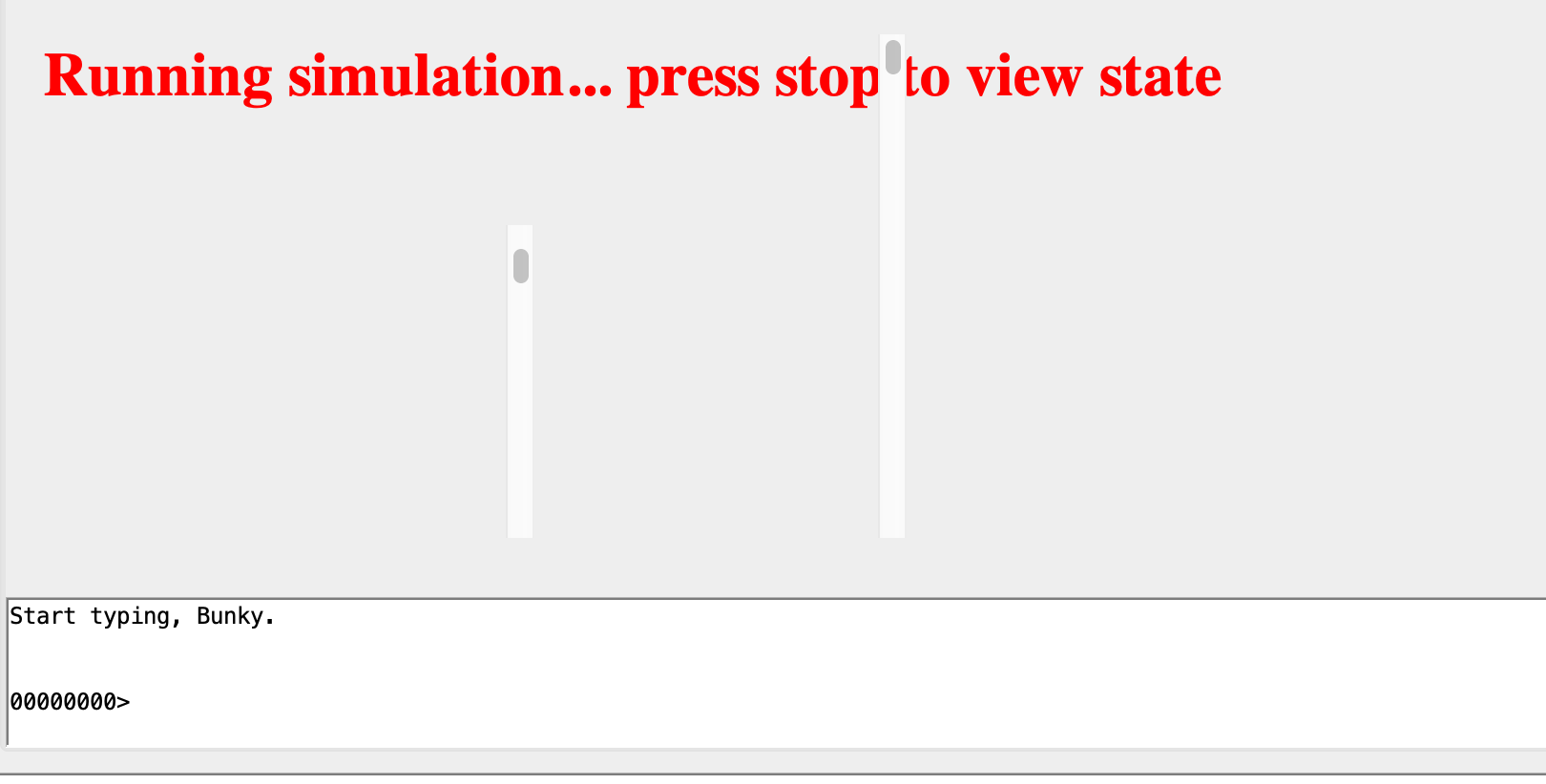
As you type, each character is echoed to the console and when you hit return the whole sentence is translated into Pig Latin and written to the console:
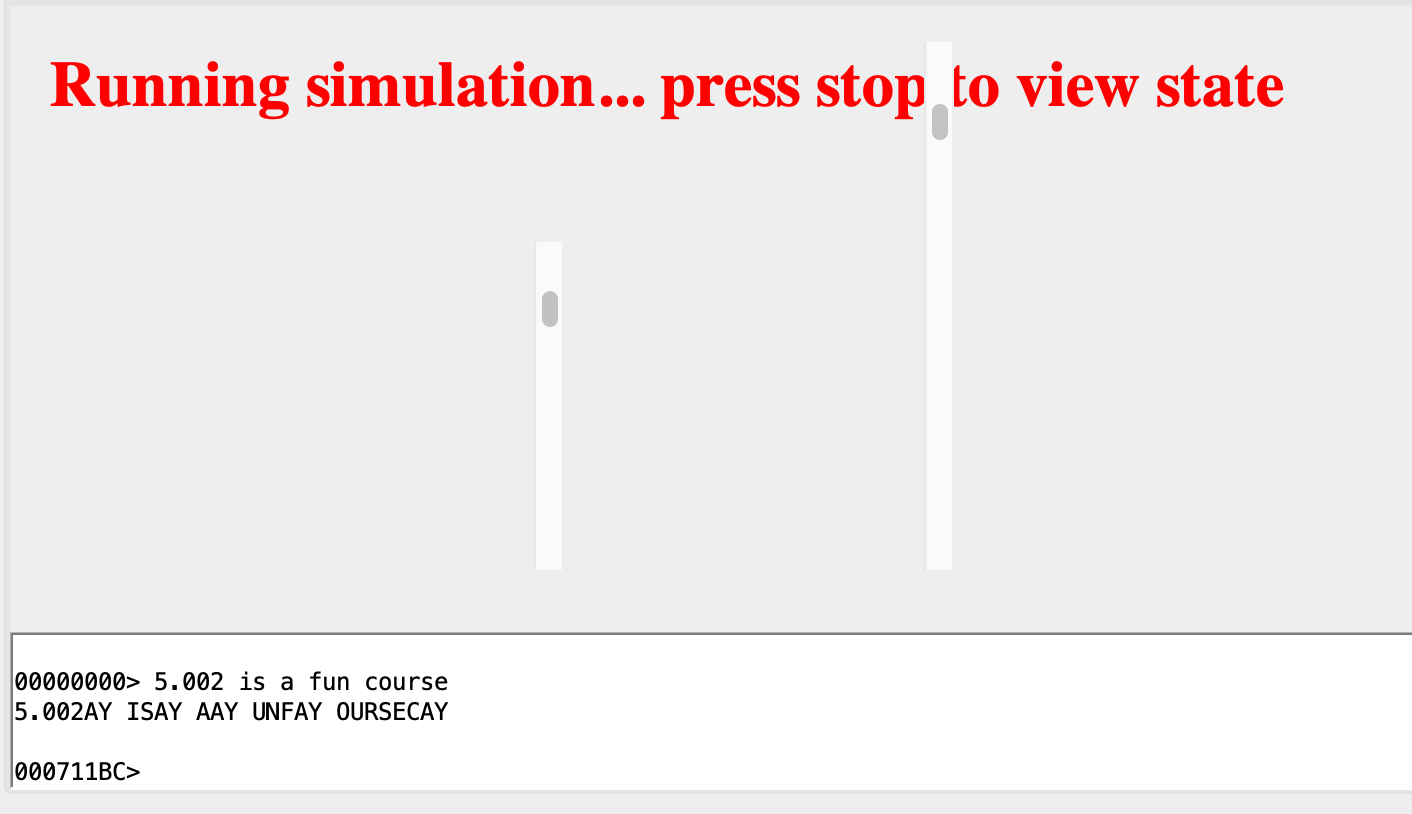
The hex number 0x000711BC written out in the screenshot above as part of the prompt is a count of the number of times one of the user-mode processes (Process 2) has been scheduled while you typed in the sentence or leave the program idling.
This program implements a primitive OS kernel for the Beta along with three simple user-mode processes hooked together thru a semaphore-controlled bounded buffer. The three processes – and the kernel – share an address space; each is allocated its own stack (for a total of 4 stacks), and each process has its own virtual machine state (ie, registers). The latter is stored in the kernel ProcTbl, which contains a data structure for each process.
Before we start, it is useful to open beta.uasm and familiarise yourself with some convenient macros, namely:
.macro CALL(label)	BR(label, LP)

.macro RTN()		JMP(LP)
.macro XRTN()		JMP(XP)
and privileged mode instructions to interact with the system I/O and other functionalities:
.macro PRIV_OP(FNCODE)		betaopc (0x00, 0, FNCODE, 0)
.macro HALT() PRIV_OP (0)
.macro RDCHAR() PRIV_OP (1)
.macro WRCHAR() PRIV_OP (2)
.macro CYCLE()	PRIV_OP (3)
.macro TIME()	PRIV_OP (4)
.macro CLICK()	PRIV_OP (5)
.macro RANDOM()	PRIV_OP (6)
.macro SEED()	PRIV_OP (7)
.macro SERVER() PRIV_OP (8)
For instance, WRCHAR() will print a single character to the terminal. this is implemented in Java (you can find it in MIT’s 6.004 bsim’s source code). Here’s a snippet of it:
  switch (inst & 0xFFFF) { // look at the last 16 bits of the instruction
    case 0: // halt
      ...
    case 1: // rdchar: return char in regs[0] or loop
      ...
      break dispatch;
    case 2: // wrchar: print char in regs[0]
      if (tty) {
        usertty.append(String.valueOf((char) regs[0]));
        try {
          usertty.setCaretPosition(usertty.getText().length() - 1);
        } catch (Exception e) {
        }
        Thread.yield();
      } else
        Trap(ILLOP);
      break dispatch;
    case 3: // cycle: return current cycle count in regs[0]
      ...
Supervisor Mode
All kernel code is executed with the Kernel-mode bit of the program counter – its highest-order bit (MSB) — set. This causes new interrupt requests to be deferred until the kernel returns to user mode.
Checkoff and Lab Questionnaire
You are required to finish the lab questionnaire on eDimension and complete two CHECKOFF during this session. Simply show that your bsim simulates the desirable checkoff outcome for Part A and Part B (binary grading, either you complete it or you don’t) of the lab. Read along to find out more.
Asynchronous Interrupts
tinyOS.uasm implements the following functionality to support Asynchronous Interrupts:
Vectored Interrupt Routine
Kernel-mode vector interrupt routine for handling input from the keyboard, clock, reset, and illegal instruction (trap).
||| Interrupt vectors:

. = VEC_RESET
	BR(I_Reset)	| on Reset (start-up)
. = VEC_II
	BR(I_IllOp)	| on Illegal Instruction (eg SVC)
. = VEC_CLK
	BR(I_Clk)	| On Clock interrupt
. = VEC_KBD
	BR(I_Kbd)	| on Keyboard interrupt
. = VEC_MOUSE
	BR(I_BadInt)	| on Mouse interrupt
Keyboard Interrupt Handling
A keyboard key press causes the asynchronous interrupt to occur, which results in the execution of a keyboard interrupt handler labelled I_Kbd. Incoming characters are stored in a kernel buffer called Key_State for subsequent use by user-mode programs.
Key_State: LONG(0)			| 1-char keyboard buffer.

I_Kbd:	ENTER_INTERRUPT()		| Adjust the PC!
	ST(r0, UserMState)		| Save ONLY r0...
	RDCHAR()			| Read the character,
	ST(r0,Key_State)		| save its code.
	LD(UserMState, r0)		| restore r0, and
	JMP(xp)				| and return to the user.
Reset Handling
I_Reset:
	CMOVE(P0Stack, SP)
	CMOVE(P0Start, XP)
	JMP(XP)
Upon startup, we will begin executing Process 0, which instruction address resides at address with label P0Start.
Clock Interrupt Handling
The clock interrupt invokes the scheduler asynchronously. Each compute-bound process gets a quantum consisting of TICS clock interrupts, where TICS is the number stored in the variable Tics below. To avoid overhead, we do a full state save only when the clock interrupt will cause a process swap, using the TicsLeft variable as a counter.
We do a LIMITED state save (R0 only) in order to free up a register, then reduce TicsLeft by 1. When it becomes negative, we do a FULL state save and call the scheduler; otherwise we just return, having burned only a few clock cycles on the interrupt. RECALL that the call to Scheduler sets TicsLeft to Tics, giving the newly-swapped-in process a full quantum.
Tics:	LONG(2)			| Number of clock interrupts/quantum.
TicsLeft: LONG(0)		| Number of tics left in this quantum

I_Clk:	ENTER_INTERRUPT()	| Adjust the PC!
	ST(r0, UserMState)	| Save R0 ONLY, for now.
	LD(TicsLeft, r0)	| Count down TicsLeft
	SUBC(r0,1,r0)
	ST(r0, TicsLeft)	| Now there's one left.
	CMPLTC(r0, 0, r0)	| If new value is negative, then
	BT(r0, DoSwap)		|   swap processes.
	LD(UserMState, r0)	| Else restore r0, and
	JMP(XP)			| return to same user.

DoSwap:	LD(UserMState, r0)	| Restore r0, so we can do a
	SAVESTATE()		|   FULL State save.
	LD(KStack, SP)		| Install kernel stack pointer.
	CALL(Scheduler)		| Swap it out!
	BR(I_Rtn)		| and return to next process.
Synchronous Interrupts
tinyOS.uasm implements a few functionalities to support Synchronous Interrupts (also known as trap or supervisor call). Kernel-mode supervisor call dispatching and a repertoire of call handlers that provide simple I/O services to user-mode programs include:
Halt()– stop a user-mode process (equivalent to closing or killing the process)WrMsg()– write a null-terminatedASCIIstring to the consoleWrCh()– write theASCIIcharacter found inR0to the consoleGetKey()– return the nextASCIIcharacter from the keyboard inR0; this call does not return to the user (blocks) until there is a character available.HexPrt()– convert the value passed in R0 to a hexadecimal string and output it to the console.Yield()– immediately schedule the next user-mode program for execution. Execution will resume in the usual fashion when the round-robin scheduler chooses this process again.
Implementing SVC
Supervisor calls are actually unimplemented instructions that cause the expected trap when executed. Any illegal instruction will cause the ILLOP handler to be executed:
I_IllOp:
	SAVESTATE()		| Save the machine state.
	LD(KStack, SP)		| Install kernel stack pointer.

	LD(XP, -4, r0)		| Fetch the illegal instruction
	SHRC(r0, 26, r0)	| Extract the 6-bit OPCODE, SVC opcode is 000001 (second element of the table)
	SHLC(r0, 2, r0)		| Make it a WORD (4-byte) index
	LD(r0, UUOTbl, r0)	| Fetch UUOTbl[OPCODE]
	JMP(r0)			| and dispatch to the UUO handler.


.macro UUO(ADR) LONG(ADR+PC_SUPERVISOR)	| Auxiliary Macros
.macro BAD()	UUO(UUOError)

UUOTbl:	BAD()		UUO(SVC_UUO)	BAD()		BAD()
	BAD()		BAD()		BAD()		BAD()
	BAD()		BAD()		BAD()		BAD()
	BAD()		BAD()		BAD()		BAD()
	BAD()		BAD()		BAD()		BAD()
	BAD()		BAD()		BAD()		BAD()
	BAD()		BAD()		BAD()		BAD()
	BAD()		BAD()		BAD()		BAD()
	BAD()		BAD()		BAD()		BAD()
	BAD()		BAD()		BAD()		BAD()
	BAD()		BAD()		BAD()		BAD()
	BAD()		BAD()		BAD()		BAD()
	BAD()		BAD()		BAD()		BAD()
	BAD()		BAD()		BAD()		BAD()
	BAD()		BAD()		BAD()		BAD()
	BAD()		BAD()		BAD()		BAD()
....
Kernel code should reside in the memory region with MSB of 1, as per Beta’s way of setting Kernel mode. However, note that BSim memory is not actually 4GB in size. The UUOTbl actually resides in address 0x054C:
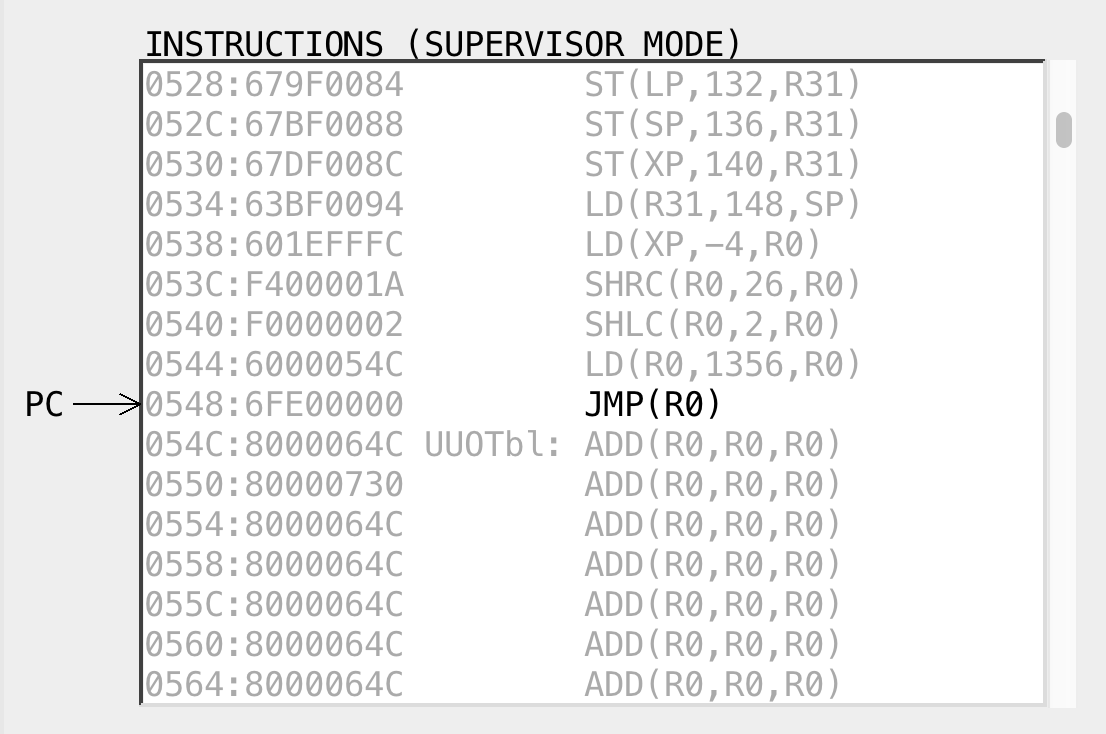
To work around this, we use the macro .macro UUO(ADR) LONG(ADR+PC_SUPERVISOR) | Auxiliary Macros, which simply adds MSB of 1 in the content of the UUOTbl, which makes the PC to be in Supervisor mode when we execute JMP(r0) to dispatch the UUO handler.
The illegal instruction trap handler looks for illegal instructions it knows to be supervisor calls and calls the appropriate handler defined in SVC_UUO, which makes use of the SVC_Tbl to branch to the appropriate trap handler based on the service call being made:
SVC_UUO:
	LD(XP, -4, r0)		| The faulting instruction.
	ANDC(r0,0x7,r0)		| Pick out low bits,
	SHLC(r0,2,r0)		| make a word index,
	LD(r0,SVCTbl,r0)	| and fetch the table entry.
	JMP(r0)

SVCTbl:	UUO(HaltH)		| SVC(0): User-mode HALT instruction
	UUO(WrMsgH)		| SVC(1): Write message
	UUO(WrChH)		| SVC(2): Write Character
	UUO(GetKeyH)		| SVC(3): Get Key
	UUO(HexPrtH)		| SVC(4): Hex Print
	UUO(WaitH)		| SVC(5): Wait(S) ,,, S in R3
	UUO(SignalH)		| SVC(6): Signal(S), S in R3
	UUO(YieldH)		| SVC(7): Yield()
The translation between SVC(0) to Halt(), SVC(1) to WrMsg() and so on is declared as macros to interface with the Kernel code.
||| Definitions of macros used to interface with Kernel code:

.macro Halt()	SVC(0)		| Stop a process.

.macro WrMsg()	SVC(1)		| Write the 0-terminated msg following SVC
.macro WrCh()	SVC(2)		| Write a character whose code is in R0

.macro GetKey()	SVC(3)		| Read a key from the keyboard into R0
.macro HexPrt()	SVC(4)		| Hex Print the value in R0.

.macro Yield()	SVC(7)		| Give up remaining quantum
Note that this is just for convenience. The macro declarations are made so that we can conveniently write Halt() as part of our instruction instead of the more unintuitive version of it, e.g: SVC(0).
Halt Handler
The Halt() handler is implemented as follows:
HaltH: BR(I_Wait) | SVC(0): User-mode HALT SVC
It pauses the current execution of the calling process, then forces the CPU to execute I_Wait, which contains a routine to call the scheduler and therefore schedule other processes (if it exists). You will learn more about process scheduling in the weeks to come.
Write Message and Write Char Handler
The WrMsg() is equivalent to a regular print statement. Its purpose is to print a 0-terminated message. We can define a string immediately following the WrMsg() instruction. Execution resumes with the instruction following the string as such:
WrMsg()
.text “This text is sent to the console…\n”
* …next instruction…
The handler is implemented as follows:
WrMsgH:	LD(UserMState+(4*30), r0)	| Fetch interrupted XP, then
	CALL(KMsgAux)			| print text following SVC.
	ST(r0,UserMState+(4*30))	| Store updated XP.
	BR(I_Rtn)
It calls an Auxiliary routine for sending message to the console. This routine must be called while in supervisor mode. On entry, R0 should point to data; on return, R0 holds next longword aligned location after data.
KMsgAux:
	PUSH(r1)
	PUSH(r2)
	PUSH(r3)
	PUSH(r4)

	MOVE (R0, R1)

WrWord:	LD (R1, 0, R2)		| Fetch a 4-byte word into R2
	ADDC (R1, 4, R1)	| Increment word pointer
	CMOVE(4,r3)		| Byte/word counter

WrByte:	ANDC(r2, 0x7F, r0)	| Grab next byte -- LOW end first!
	BEQ(r0, WrEnd)		| Zero byte means end of text.
	WRCHAR()		| Print it.
	SRAC(r2,8,r2)		| Shift out this byte
	SUBC(r3,1,r3)		| Count down... done with this word?
	BNE(r3,WrByte)		| Nope, continue.
	BR(WrWord)		| Yup, on to next.

WrEnd:
	MOVE (R1, R0)
	POP(r4)
	POP(r3)
	POP(r2)
	POP(r1)
	RTN()
When the routine returns back to WrMsgH(), it will return to the calling user process and resume its execution.
WrChH() works similarly, but in this case we just print out 1 character that we have put in R0 so we don’t have to go through the whole ordeal of “loading a string” from the regs to be printed on screen.
WrChH:	LD(UserMState,r0)		| The user's <R0>
	WRCHAR()			| Write out the character,
	BR(I_Rtn)			| then return
GetKey Handler
The purpose of this handler is to read a single keystroke from the Key_State, a dedicated space in the Kernel to hold the current keystroke into R0 so that the calling user process can use it.
Key_State: LONG(0)			| 1-char keyboard buffer.

GetKeyH:				| return key code in r0, or block
	LD(Key_State, r0)
	BEQ(r0, I_Wait)			| on 0, just wait a while

| key ready, return it and clear the key buffer
	LD(Key_State, r0)		| Fetch character to return
	ST(r0,UserMState)		| return it in R0.
	ST(r31, Key_State)		| Clear kbd buffer
	BR(I_Rtn)			| and return to user.
HexPrt Handler
Similar to WrCh(), we print the value placed in R0 in hex form (instead of char form).
HexPrtH:
	LD(UserMState,r0)		| Load user R0
	CALL(KHexPrt)			| Print it out
	BR(I_Rtn)			| And return to user
KHexPrt is a hex print procedure defined as follows. It goes through the 32-bit word stored at R0, and process it nybble (half a byte) by nybble.
HexDig:	LONG('0') LONG('1') LONG('2') LONG('3') LONG('4') LONG('5')
	LONG('6') LONG('7') LONG('8') LONG('9') LONG('A') LONG('B')
	LONG('C') LONG('D') LONG('E') LONG('F')

KHexPrt:
	PUSH(r0)		| Saves all regs, incl r0
	PUSH(r1)
	PUSH(r2)
	PUSH(lp)

	CMOVE(8, r2)
	MOVE(r0,r1)
KHexPr1:
	SRAC(r1,28,r0)			| Extract digit into r0.
	MULC(r1, 16, r1)		| Next loop, next nybble...
	ANDC(r0, 0xF, r0)
	MULC(r0, 4, r0)
	LD(r0, HexDig, r0)
	WRCHAR ()
	SUBC(r2,1,r2)
	BNE(r2,KHexPr1)

	POP(lp)
	POP(r2)
	POP(r1)
	POP(r0)
	RTN()
Yield Handler
Finally, a Yield() is called when a user process wants to give up the remaining quanta so that other process can be scheduled.
YieldH: CALL(Scheduler)		| Schedule next process, and
	BR(I_Rtn)		| and return to user.
Processes are given equal time slices called quanta (or quantums) takes turns of one quantum each. if a process finishes early, before its quantum expires, the next process starts immediately and gets a full quantum.
User Programs
tinyOS.uasm also contains code for three user programs named P0, P1, and P2. They’re located towards the end of tinyOS.uasm. We will not dive in too deep about who each user programs is scheduled (that will be for another lab). For now, here’s all the information you need:
P0: Prompts the user for new lines of input and store the inputP1: Converts the given input into piglatin and printing it back to the terminalP2: Increments an internal counter andYield(). Thanks toP2, you can see some numbers printed at the prompt