You are expected to continue where you left off from Lab 2. We will be using TinyOS in this lab to implement more user processes and synchronise their execution using Semaphore.
Checkoff and Lab Questionnaire
You are required to finish the lab questionnaire on eDimension and complete two CHECKOFF during this session. Simply show that your bsim simulates the desirable checkoff outcome for Part A and Part B (binary grading, either you complete it or you don’t) of the lab. Read along to find out more.
There will be no makeup slot for checkoff for this lab. If you miss the class in Week 4 with no LOA, you get zero. If you have LOA, show it to our TAs and you can checkoff during the following Week’s Lab session or at the TA’s discretion.
Scheduler
The timesharing system in TinyOS is supported by a round-robin scheduler,
Scheduler:
	PUSH(LP)
	CMOVE(UserMState, r0)
	LD(CurProc, r1)
	CALL(CopyMState)		| Copy UserMState -> CurProc

	LD(CurProc, r0)
	ADDC(r0, 4*31, r0)		| Increment to next process..
	CMPLTC(r0,CurProc, r1)		| End of ProcTbl?
	BT(r1, Sched1)			| Nope, its OK.
	CMOVE(ProcTbl, r0)		| yup, back to Process 0.

Sched1:	ST(r0, CurProc)			| Here's the new process;

	ADDC(r31, UserMState, r1)	| Swap new process in.
	CALL(CopyMState)
	LD(Tics, r0)			| Reset TicsLeft counter
	ST(r0, TicsLeft)		|   to Tics.
	POP(LP)
	JMP(LP)				| and return to caller.
The Process Table
The scheduler relies on a kernel data structure called the Process Table (symbolised as ProcTbl). It saves the states of the paused process so we can resume them later when it is their turn to run again.
ProcTbl:
	STORAGE(29)		| Process 0: R0-R28
	LONG(P0Stack)		| Process 0: SP
	LONG(P0Start)		| Process 0: XP (= PC)

	STORAGE(29)		| Process 1: R0-R28
	LONG(P1Stack)		| Process 1: SP
	LONG(P1Start)		| Process 1: XP (= PC)

	STORAGE(29)		| Process 2: R0-R28
	LONG(P2Stack)		| Process 2: SP
	LONG(P2Start)		| Process 2: XP (= PC)

CurProc: LONG(ProcTbl)
The scheduler is invoked by periodic clock interrupts or when a user-mode program makes a Yield() supervisor call. Notice that we use the clock option in the beginning of the script:
.options clock
This clock will cause asynchronous interrupt that calls BR(I_Clk) on every rising edge. This handler labelled I_Clk decides whether a process swap swap is needed or not. We have seen this before in Week 2 lab when we went through all asynchronous interrupt handler.
Tics:	LONG(2)			| Number of clock interrupts/quantum.
TicsLeft: LONG(0)		| Number of tics left in this quantum

I_Clk:	ENTER_INTERRUPT()	| Adjust the PC!
	ST(r0, UserMState)	| Save R0 ONLY, for now.
	LD(TicsLeft, r0)	| Count down TicsLeft
	SUBC(r0,1,r0)
	ST(r0, TicsLeft)	| Now there's one left.
	CMPLTC(r0, 0, r0)	| If new value is negative, then
	BT(r0, DoSwap)		|   swap processes.
	LD(UserMState, r0)	| Else restore r0, and
	JMP(XP)			| return to same user.

DoSwap:	LD(UserMState, r0)	| Restore r0, so we can do a
	SAVESTATE()		|   FULL State save.
	LD(KStack, SP)		| Install kernel stack pointer.
	CALL(Scheduler)		| Swap it out!
	BR(I_Rtn)		| and return to next process.
User Programs
tinyOS.uasm also contains code for three programs. Each program runs in a separate user-mode process.
Process 0
Process 0 prompts the user for new lines of input in P0Read. It then reads lines from the keyboard in P0RdCh using the GetKey() supervisor call and sends them to Process 1 in P0PutC using the Send() procedure.
Prompt:	semaphore(1)		| To keep us from typing next prompt
				| while P1 is typing previous output.

P0Start:WrMsg()
	.text "Start typing, Bunky.\n\n"

P0Read:	Wait(Prompt)		| Wait until P1 has caught up...
	WrMsg()			| First a newline character, then
	.text "\n"
	LD(Count3, r0)		| print out the quantum count
	HexPrt()		|  as part of the count, then
	 WrMsg()		|  the remainder.
	.text "> "

	LD(P0LinP, r3)		| ...then read a line into buffer...

P0RdCh: GetKey()		| read next character,

	WrCh()			| echo back to user
	CALL(UCase)		| Convert it to upper case,
	ST(r0,0,r3)		| Store it in buffer.
	ADDC(r3,4,r3)		| Incr pointer to next char...

	CMPEQC(r0,0xA,r1)	| End of line?
	BT(r1,P0Send)		| yup, transmit buffer to P1

	CMPEQC(r3,P0LinP-4,r1)	| are we at end of buffer?
	BF(r1,P0RdCh)		| nope, read another char
	CMOVE(0xA,r0)		| end of buffer, force a newline
	ST(r0,0,r3)
	WrCh()			| and echo it to the user

P0Send:	LD(P0LinP,r2)		| Prepare to empty buffer.
P0PutC: LD(r2,0,r0)		| read next char from buf,
	CALL(Send)		| send to P1
	CMPEQC(r0,0xA,r1)	| Is it end of line?
	BT(r1,P0Read)		| Yup, read another line.

	ADDC(r2,4,r2)		| Else move to next char.
	BR(P0PutC)

P0Line: STORAGE(100)		| Line buffer.
P0LinP: LONG(P0Line)

P0Stack:
	STORAGE(256)
Bounded Buffer FIFO
Send() implements a bounded buffer that is synchronized through the use of semaphores in user mode. Recall that a semaphore is a service provided by the Kernel so that two isolated processes running on a Virtual Machine can communicate and synchronize.
The bounded buffer FIFO routine for our Beta (in user mode) is as follows. It follows the producer and consumer model, and the shared buffer can be found at FIFO having a size of 100 words.
FIFOSIZE = 100
FIFO:	STORAGE(FIFOSIZE)	| FIFO buffer.

IN:	LONG(0)			| IN pointer: index into FIFO
OUT:	LONG(0)			| OUT pointer: index into FIFO

Chars:	semaphore(0)		| Flow-control semaphore 1
Holes:	semaphore(FIFOSIZE)	| Flow-control semaphore 2

||| Send: put <r0> into fifo.
Send:	PUSH(r1)		| Save some regs...
	PUSH(r2)
	Wait(Holes)		| Wait for space in buffer...

	LD(IN,r1)		| IN pointer...
	MULC(r1,4,r2)		| Compute 4*IN, word offset
	ST(r0,FIFO,r2)		| FIFO[IN] = ch
	ADDC(r1,1,r1)		| Next time, next slot.
	CMPEQC(r1,FIFOSIZE,r2)	| End of buffer?
	BF(r2,Send1)		| nope.
	CMOVE(0,r1)		| yup, wrap around.
Send1:	ST(r1,IN)		| Tuck away input pointer

	Signal(Chars)		| Now another Rcv() can happen
	POP(R2)
	POP(r1)
	RTN()

||| Rcv: Get char from fifo into r0.

Rcv:	PUSH(r1)
	PUSH(r2)
	Wait(Chars)		| Wait until FIFO non-empty

	LD(OUT,r1)		| OUT pointer...
	MULC(r1,4,r2)		| Compute 4*OUT, word offset
	LD(r2,FIFO,r0)		| result = FIFO[OUT]
	ADDC(r1,1,r1)		| Next time, next slot.
	CMPEQC(r1,FIFOSIZE,r2)	| End of buffer?
	BF(r2,Rcv1)		| nope.
	CMOVE(0,r1)		| yup, wrap around.
Rcv1:	ST(r1,OUT)		| Tuck away input pointer

	Signal(Holes)		| Now theres space for 1 more.
	POP(R2)
	POP(r1)
	RTN()
In short, CALL(Send) sends datum in r0 through pipe (produce) and CALL(Rcv) reads datum from pipe into r0 (consume). Any process calling Send and Rcv will be synchronised using the semaphores Chars and Holes, analogous to what we have learned during the lecture.`
“Pipe” here is a name given that signifies the means of communication between two processes using shared memory region. It is implemented via FIFO bounded buffer and semaphore. The user processes simply CALL(Send) or CALL(Rcv) to “use” the pipe. Our OS is so simple and does not implement address virtualisation, so the statement of “shared memory” feels redundant because any process can LD/ST directly from another process’ address space, but you can think of the FIFO buffer as a “legally” shared memory region between the two communicating processes.
Kernel Semaphore
Recall that a semaphore is a variable used to control access to a common resource by multiple processes. In other words, it is a variable controlled by the Kernel to allow two or more processes to synchronise. The semaphore can be seen as a generalised mutual exclusion (mutex) lock. It is implemented at the kernel level, meaning that the execution of semaphore operations (WaitH, and SignalH) requires the calling process to change into the kernel mode.
In its simplest form, it can be thought of as a data structure that contains a guarded integer that represents the number of resources available for the pool of processes that require it.
The instructions in tinyOS.uasm that implements Semaphore is as follows:
WaitH:	LD(r3,0,r0)		| Fetch semaphore value.
	BEQ(r0,I_Wait)		| If zero, block..

	SUBC(r0,1,r0)		| else, decrement and return.
	ST(r0,0,r3)		| Store back into semaphore
	BR(I_Rtn)		| and return to user.

||| Kernel handler: signal(s):
||| ADDRESS of semaphore s in r3.


SignalH:LD(r3,0,r0)		| Fetch semaphore value.
	ADDC(r0,1,r0)		| increment it,
	ST(r0,0,r3)		| Store new semaphore value.
	BR(I_Rtn)		| and return to user.
Unlike real-world applications, this lab does not actually implement virtual addressing so there’s no separation between Kernel and User space in memory (although it has dual mode to prevent interrupts in Kernel mode) due to simplification. We can still perform a LD to Kernel variables in User Mode in this lab as User processes also work in the physical space.
Auxiliaries for User Process
There are other auxiliaries created for the user programs, such as to convert char in r0 to upper case (UCase) and test if R0 is a vowel; put boolean answer into R1 (VowelP). You can read their instructions near the end of P0 instructions in tinyOS.uasm.
| Auxilliary routine: convert char in r0 to upper case:
UCase:	PUSH(r1)
	CMPLEC(r0,'z',r1)	| Is it beyond 'z'?
	BF(r1,UCase1)		| yup, don't convert.
	CMPLTC(r0,'a',r1)	| Is it before 'a'?
	BT(r1, UCase1)		| yup, no change.
	SUBC(r0,'a'-'A',r0)	| Map to UPPER CASE...
UCase1: POP(r1)
	RTN()

| Auxilliary routine: Test if <r0> is a vowel; boolean into r1.
VowelP: CMPEQC(r0,'A',r1)	| Sorta brute force...
	BT(r1,Vowel1)
	CMPEQC(r0,'E',r1)	BT(r1,Vowel1)
	CMPEQC(r0,'I',r1)	BT(r1,Vowel1)
	CMPEQC(r0,'O',r1)	BT(r1,Vowel1)
	CMPEQC(r0,'U',r1)	BT(r1,Vowel1)
	CMPEQC(r0,'Y',r1)	BT(r1,Vowel1)
	CMOVE(0,r1)		| Return FALSE.
Vowel1: RTN()
Part A: Add fourth user-mode process P3 that reports mouse clicks
In this task, we would have to modify the kernel to add support for a fourth user-mode process. Add user-mode code for the new process that calls Mouse() and then prints out a message of the form:
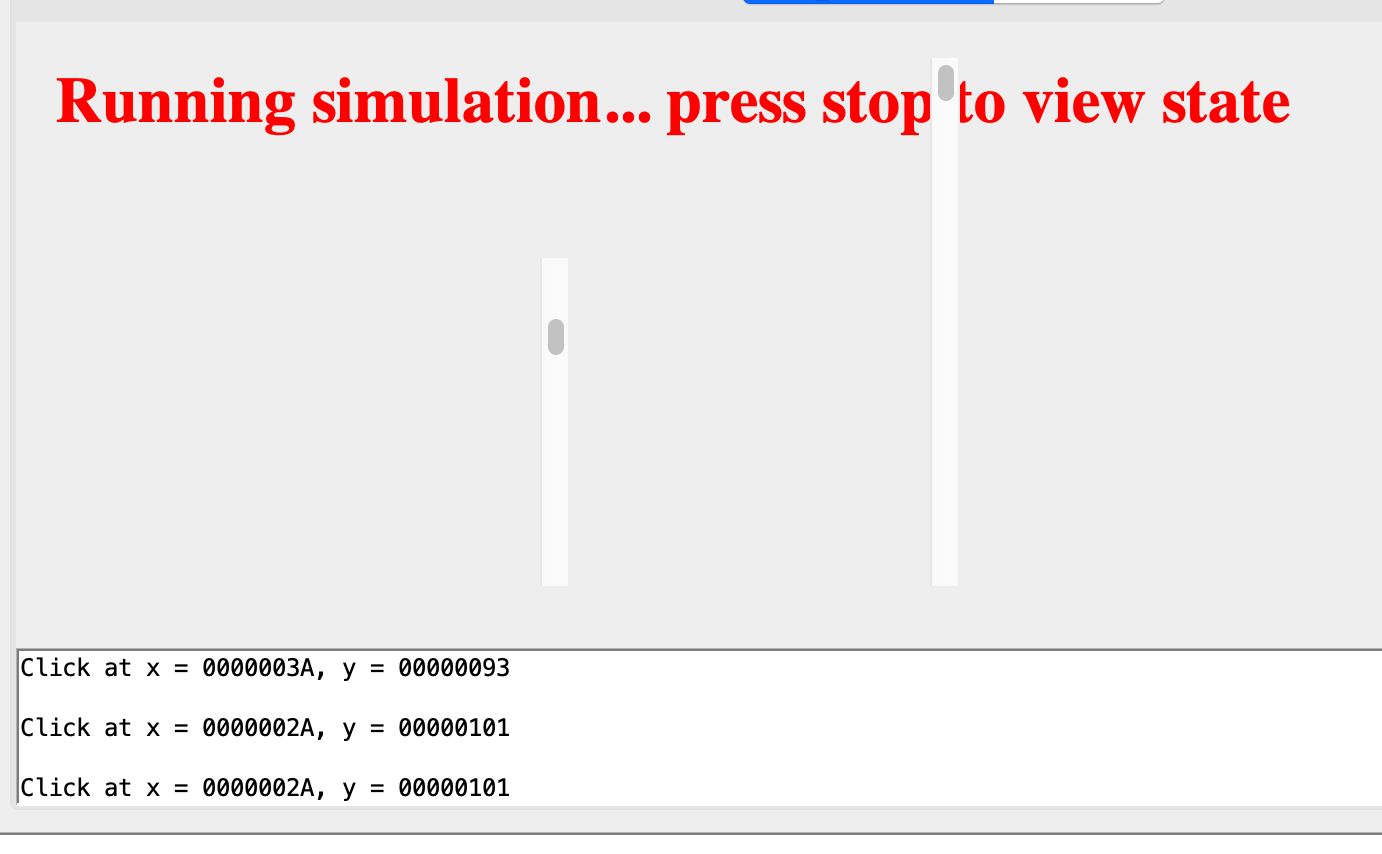
Each click message should appear on its own line (i.e., it should be preceded and followed by a newline character). You can use WrMsg() and HexPrt() to send the message; see the code for Process 0 for an example of how this is done. Write the instruction for P3 below where P2 ends. For instance:
||||||||||||||||||||||||||||||||||||||||||||||||||||||||||||||||||||||||
||| LAB 4 PART A: USER MODE Process 3 -- Display Mouse info click
||||||||||||||||||||||||||||||||||||||||||||||||||||||||||||||||||||||||


P3Start:
	|||| LAB 4 PART A -- make MOUSE SVC call and print it out
    ... your answer here
Scheduling P3
You also need to modify the Kernel’s process table to support the scheduling of four processes instead of three.
||| The kernel variable CurProc always points to the ProcTbl entry
|||  corresponding to the "swapped in" process.

ProcTbl:
	STORAGE(29)		| Process 0: R0-R28
	LONG(P0Stack)		| Process 0: SP
	LONG(P0Start)		| Process 0: XP (= PC)

	STORAGE(29)		| Process 1: R0-R28
	LONG(P1Stack)		| Process 1: SP
	LONG(P1Start)		| Process 1: XP (= PC)

    STORAGE(29)		| Process 2: R0-R28
	LONG(P2Stack)		| Process 2: SP
	LONG(P2Start)		| Process 2: XP (= PC)

    .. add more process control block here
Task 1
CHECKOFF
Demonstrate the above result of printing the mouse coordinates (when the mouse clicks at the terminal area) to your instructor / TA in class.