Finally, you need to coordinate the operation of the user-mode processes so that click messages only appear after the prompt has been output but before you have started typing in a sentence to be translated. This can be done using semaphores.
Part B: Synchronize mouse reporting with other I/O using Semaphores
In other words, once you start typing in a sentence, click messages should be delayed until after the next prompt. If the user clicks multiple times after they have started typing, only a SINGLE click message needs to be displayed (describing either the first or last click, your choice).
You may declare a mouse semaphore in P3, and immediately Wait (attempt to decrease) for the Semaphore:
MouseSemaphore: semaphore(0)	| Semaphore for mouse, initialised from zero

P3Start:

	Wait(MouseSemaphore) 	| proceed only when prompt has shown
    | ... implement printing of click coordinates here

    Signal(Prompt) | signal the prompt so it will print another prompt
    | ... continue implementation
You can learn how Wait(Prompt) and Signal(Prompt) works on Semaphore prompt in P0 and P1. Note that P0 and P1 synchronises its execution because the prompt printing in P0 only happens after P1 has finished printing out the piglatin!
Non-blocking SVC
You also need two more non-blocking supervisor calls to check for any keyboard press and check for any mouse click because we need to know whether we have typed something (and delay the mouse click printout in P3):
.macro CheckMouse() SVC(9) 	| Part D: TO CHECK MOUSE CLICK, NON BLOCKING
.macro CheckKeyboard() SVC(10) 	| Part D: TO CHECK KEYBOARD CLICK, NON BLOCKING
Update the corresponding SVC_tbl to support these two:
SVCTbl:	UUO(HaltH)		| SVC(0): User-mode HALT instruction
	UUO(WrMsgH)		| SVC(1): Write message
    ...
	UUO(CheckMouseH)| SVC(9) : CheckMouse()
	UUO(CheckKeyH)	| SVC(10) : CheckKeyboard()
The implementation of the two service handlers above is suggested to be as follows:
Note that we consider that empty mouse click buffer contains constant -1 and not 0. If you implemented it as 0, then it means that mouse click at coordinate 0,0 is not seen as a valid mouse click. Please adjust your implementation from Week 2 accordingly.
||| LAB 4 PART B: add new handler to check keyboard state, but doesn't clear it and doesn't block the calling process
CheckKeyH:
	LD(Key_State, r0)
	ST(r0,UserMState)		| return it in R0.
	BR(I_Rtn)			| and return to user.

||| LAB 4 PART B: add new handler to check mouse state, but doesn't clear it and doesn't block the calling process
CheckMouseH:
	LD(Mouse_State, r0) 	| put the content of Mouse_State to R0
	ST(r0,UserMState)		| return it in R0 of the user state since UserMState points to the R0 of the user reg value
	BR(I_Rtn)			| and return to user
And then, somewhere in P0 after the prompt is printed out, you should check whether there exist mouse click OR keyboard click, and signal (increase) the semaphore accordingly:
P0Read:	Wait(Prompt)		| Wait until P1 has caught up...
	WrMsg()			| First a newline character, then
	.text "\n"
	LD(Count3, r0)		| print out the quantum count
	HexPrt()		|  as part of the count, then
	 WrMsg()		|  the remainder.
	.text "> "
	LD(P0LinP, r3)		| ...then read a line into buffer...

||||||||||||||||||||||||||||||||||||||||||||||||||||||||||||||||||||||
||||| LAB 4 PART B: TO SYNCHRONISE, busy wait
beginCheckMouse:	CheckMouse()
					CMPEQC(R0, -1, R0) | "empty" mouse click buffer contains -1, because 0 is a coordinate
					BNE(R0, beginCheckKeyboard)
					Signal(MouseSemaphore)		| if there is mouse click, give signal
					Yield() | let P3 print sooner, give up the current quanta
					BR(P0Read)		| and restart process

beginCheckKeyboard: CheckKeyboard()
    BEQ(R0, beginCheckMouse)
||||| END OF Part D
||||||||||||||||||||||||||||||||||||||||||||||||||||||||||||||||||||||

P0RdCh: GetKey()		| read next character,
	WrCh()			| echo back to user
    ...
In summary, here’s what is supposed to happen:
P0is scheduled first, print out one prompt, and loop betweenbeginCheckMouseandbeginCheckKeyboard- If there’s no mouse click, and no keyboard press, and timer interrupts,
P1, and thenP2will continue as per normal. WhenP3is eventually scheduled, it will not print any mouse click either because there’s no mouse click thus far. - If there’s mouse click and no keyboard press,
P0will increaseMouseSemaphoreandyield, which eventually leads toP3being scheduled sooner. This allowsP3to progress and print the click coordinates, after whichP3will increasePromptSemaphore. WhenP0is scheduled back, it will print another prompt and go back to the loop in step (1). - If there’s keyboard press first, then
P0RdChroutine will be executed, where user input will be reflected on the screen and piglatin will be printed after user presses the return carriage (Enter). If there’s mouse click during this time,P3will not advance and print the click message becauseMouseSemaphorevalue is 0. The only way to increase it is whenbeginCheckMouseroutine inP0goes through. - Only after the user presses the return carriage, and
P1prints the piglatin andSignal(Prompt), thenP0can print the prompt and enterbeginCheckMouseagain. If any mouse press is made when the user was in the middle of typing something, then we will process the mouse click now.
Task 2
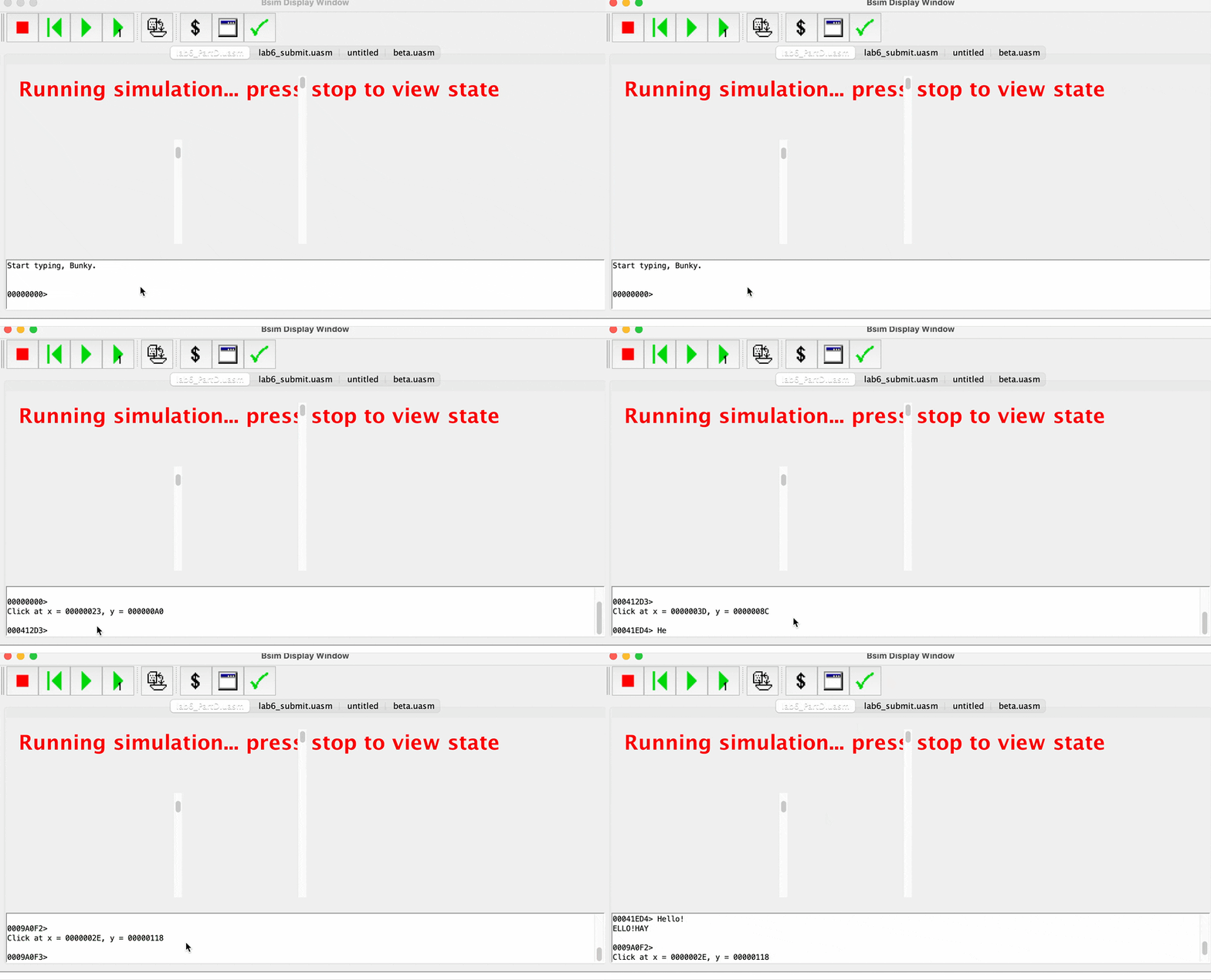
At the end, you should be able to report mouse clicks: one click printed per click, doesn’t matter if you spammed. Notice the number within the prompt must also increase (proving that P2 is scheduled properly).
When youre in the middle of typing something, e.g: Hello in the example, any click should not cause you to print any mouse coordinates until after the user entered the message (pressed carriage return).
CHECKOFF
Demonstrate the above result of delayed printing the mouse coordinates (when the mouse clicks at the terminal area and user has started typing) to your instructor / TA in class. Only one mouse click should be reported.
Summary
Notice that P0 doesn’t have to confirm that P3 has finished one round of execution (printing of x, y coordinate) before restarting to BR(P0Read) because we know that the round robin scheduler will surely execute P3 for a round once P0 calls Yield(). With the scheduler’s round robin policy and long enough quanta dedicated for each process, there won’t be the undesirable condition whereby P0 Yield() immediately returns execution to P0 again, before P3 resumes and then accidentally Signal the MouseSemaphore the second time (because it hasn’t been cleared by P3 that hasn’t progressed!).
Actually it’s also prevented by the
Signal(Prompt)in the beginning ofP0Readfor this lab, which will eventually blockP0and have the same effect anyway, but it’s important that you understand why you’re lucky!
Be very careful when using Semaphore. In the case that Signal(prompt) does not exist and without the round robin policy, MouseSemaphore value might accidentally be increased to 2 or more and we might have a future Click message printed out at the same time while typing some messages at the console, violating the condition required for Task 2 in this lab. If we want to fix this (e.g: assume there’s some form of priority scheduling policy used instead of round robin policy), we might have to check that a new mouse click is actually made in CheckMouseH by storing the previous history of mouse click at all times.